Instalador · 278 MB · Windows 10/11 · sem cadastro
a pasta como ela chegou · 40 arquivosa mesma pasta, 30 segundos depois
57.115 arquivos abrem em 0,12 s
rostos reconhecidos dentro dos vídeos
viagens descobertas por GPS + data
0 bytes enviados para fora
medido no HD do fundador, um disco comum que gira
02
02 · THE PLAYER
Press F9. Everything goes dark.
The video stops, the screen goes black, the sound cuts, open windows close and the app minimizes. Nothing plays again until you press Space. F10 closes the app outright. Try it on this page — any key brings it back.
this window works — click it
Then there is the boring half, the one you actually use all day: it opens any folder, plays videos and photos side by side, and starts muted and dark. Nothing plays by itself.
Speed from 0.25× to 4× in eleven steps. Z cycles the shape of the picture — fit, fill, 16:9, 4:3, 21:9, stretch. switches the audio track when the film has two languages. turns subtitles on, loads them, or writes them from scratch. favorites what is playing without stopping it.
It plays through VLC, decoding on your graphics card when there is one: measured here, 14 frames per second became 50.
real window · real video · English app
0:00 / 0:06
03
03 · SPEECH BECOMES SUBTITLES
Nobody wrote these subtitles.
The app listens to the video and writes the words down, with the timings. You get a real .srt file next to the video — yours, editable, readable by any player.
Subtitles created: birthday.srt
Download the .srt12 languages to search and download · 10 to translate into
It runs on your machine, so it takes roughly as long as the video itself: a 10-minute clip, about 10 minutes. Nothing is uploaded.
In a hurry? Paste a free Groq key (no card) and the same job takes seconds. Only the compressed audio goes out — never the picture. Without a key it keeps transcribing locally, exactly as before.
And then you can search for what was said.
The transcript joins the search box. Type "happy birthday" and the video where someone said it comes up — even if the file is called VID_3106.mp4.
Read it in another language.
Pick a language and your AI rewrites the transcript into it, saving a second .srt beside the video. Ten languages: Portuguese, English, Spanish, French, German, Italian, Japanese, Chinese, Korean, Russian.
Translation uses your own AI — a free Gemini key, Claude, ChatGPT, Grok, or a local model through Ollama. No key, no translation: the app says so instead of guessing.
Or fetch a subtitle someone already made.
With a free OpenSubtitles.com account, searches and downloads the best match in the language you chose — twelve to choose from: Português (Brasil), Português (Portugal), English, Español, Français, Deutsch, Italiano, Русский, 日本語, 中文, 한국어, العربية.
It mishears names and numbers, like every transcriber does. The .srt is a text file: fix the line and move on.
real transcript · sample library · English app
birthday.srt · original speech
0:00 / 0:06EN
04
04 · THE AI READS YOUR LIBRARY
Hover a photo. It already knows.
The app looks at every photo and every video, writes one sentence about it and tags it. That sentence and those tags are what make the search work later — you search the picture, not the file name.
Wi-FionYour AI · your key
hover a photo
What it writes, per file
Four people at the water's edge, late afternoon, blue sea behind them.
beach · family · outdoors
one sentence + three tags
Switch the Wi-Fi off. Nothing changes.
The built-in model (CLIP) runs on your machine and describes everything with the Wi-Fi off. It is blunt and a little generic, and it is free forever — it is already in the app.
Or plug in your own AI, and read it again.
A free Gemini key, or Claude, ChatGPT or Grok if you already pay for one, and the sentences get much better. Prefer nothing to leave at all? Point it at Ollama or LM Studio on localhost and the good model runs inside your PC too.
Your key, your account, your bill. We never see it, and the app never sells you tokens.
Where it lives
In a hidden .player folder inside the folder you opened. It travels with the files to the external drive, and the same file is never analyzed twice.
New files in an already-known folder are read on their own, in the background, at idle priority — the video you are watching always wins.
It describes generically sometimes, and you can tell. That is why the tags are editable and the search shows the closest matches first instead of faking certainty.
First run downloads about 150 MB of models. After that it works disconnected.
real AI output · sample library
hover a photoYour AI · your key
hover a photo
Summary
Tags
05
O QUE ELE ACHA SOZINHO
Quem, onde, e o que pode ir.
Ele lê os rostos. Você dá os nomes.
Fotos e vídeos são agrupados por pessoa, como no Google Fotos — só que aqui e sem enviar um rosto sequer. Dê um nome uma vez e tudo dela aparece junto: a foto de 2009 e o vídeo de ontem.
Dentro de vídeo também. O Plex, o Jellyfin e o Immich não fazem isso.
A viagem se monta sozinha.
Ele cruza a data real de cada foto com o lugar onde foi tirada. Uma rajada de fotos longe de casa vira uma pasta com nome — "2024-07-05 a 07-12 — Aruba". O dia cheio de fotos no meio da rotina vira "Aniversário 8 anos". Você confere a lista e aprova.
Fotos de WhatsApp vêm sem GPS. Entram nas viagens pela data.
Cópias iguais, lado a lado. Você decide.
Duplicados são conferidos byte a byte — não pelo nome. Lixo de download, capas de torrent e miniaturas aparecem numa lista para você revisar. Nada é apagado sozinho: vai para a Lixeira do Windows, e o botão diz isso.
Moveu, renomeou, organizou? ↩ Desfazer devolve tudo — até depois de fechar o app.
06
ENCONTRE QUALQUER CENA
Digite o que você lembra.
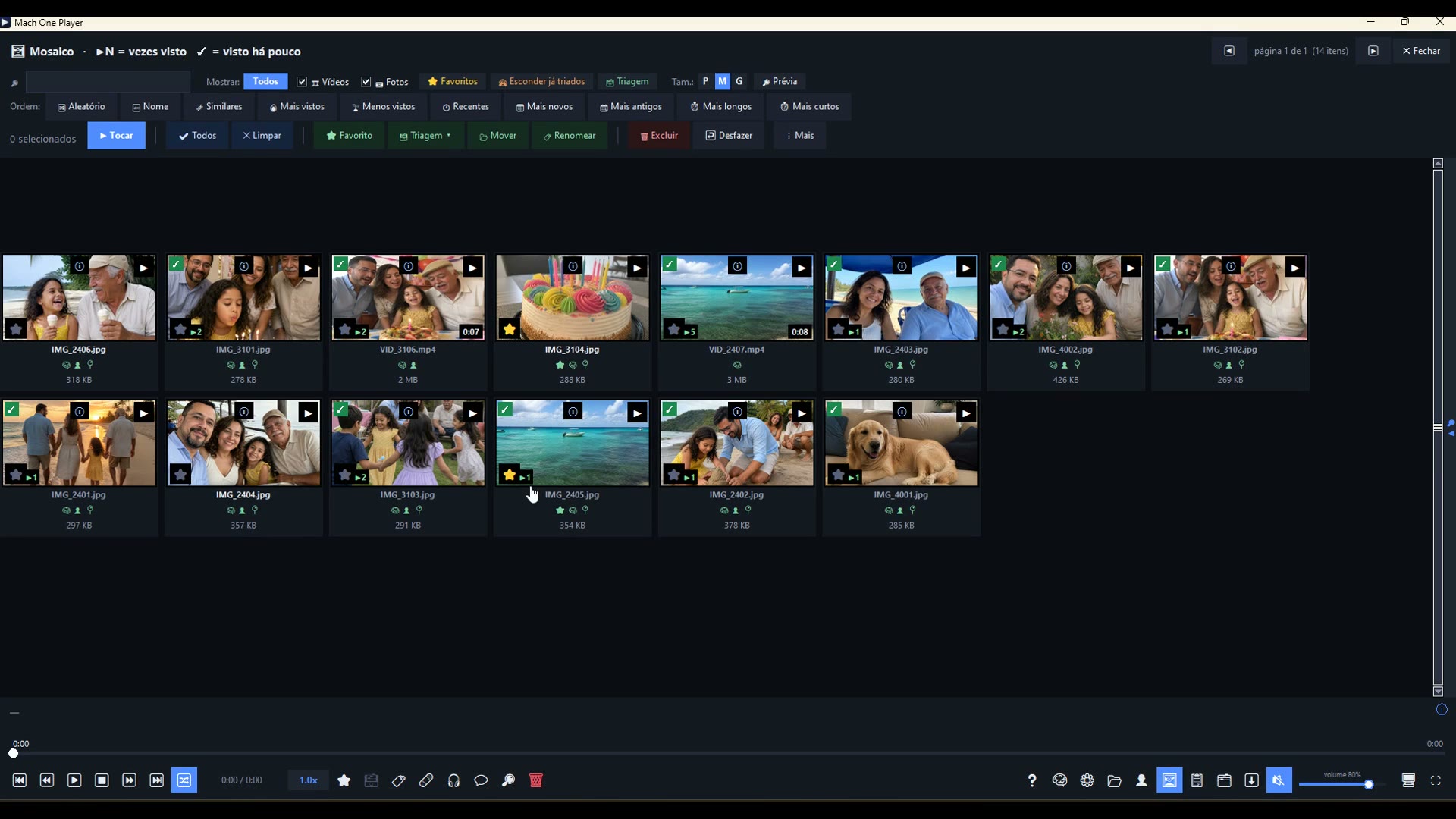
A IA descreve cada foto e vídeo e transcreve o que foi dito. Depois é só procurar como você fala: "praia com as crianças", "bolo", "julho 2024". Experimente aqui, com o acervo de exemplo:
tente:
As cenas mais parecidas sobem primeiro. Não é mágica: é a IA lendo a imagem e o som, no seu PC.
acervo de exemplo · {files} arquivos · nada seu é usado
07
07 · THE POSTER WALL
Ugly file names become a shelf.
Night.of.the.Living.Dead.1968.1080p.x264.mkv is a title, a year and a lot of noise. The app reads the title out of the name, fetches the official poster and the synopsis, and hangs the wall. Click to play.
Files from the same film become one card, so a movie split in two parts stops looking like two movies.
With your own TMDb key
Free, one minute to get, pasted once in Settings. It is your key and your account — the app makes the request on your behalf and nothing else travels: only the title it read from the file name.
Posters are cached inside the folder, so the internet is used once per title and never again.
Family videos do not get a poster
A name like 20141217_203541.mp4 is a camera, not a film. Those become albums with their own thumbnail as the cover, and TMDb is never asked — which is how a random 2014 movie poster stops landing on your daughter's birthday.
With the same key it also recognizes the cast from TMDb photos and tells you who is in the scene.
The posters on this page are public-domain films, so we can show them here.TMDb belongs to its owners; the app uses the public API with your own key.
Movies
hover a poster for the synopsis
08
08 · THE KEYBOARD
Press a key. Right now.
Every key below does something in the app. Press it here and this page will tell you what — that is the whole list, not a selection.
your keyboard works on this page
Two shortcuts per panic level, because some laptops swallow the F keys behind Fn.
If the shortcuts stop answering, click anywhere on the player — focus comes back in under half a second.
your keyboard works on this page
Send to the Recycle Bin?VID_3106.mp4
CancelRecycle Bin
VID_3106.mp41 / 40:04 / 0:121.0×muted
09
09 · PLUG-INS AND YOUR OWN AI
The app ships without them. You add what you want.
Settings → Plug-ins is a short list with a button each. Nothing is installed behind your back, and nothing you did not install shows up in the menus.
Downloader
Adds the ⬇ button: video sites through yt-dlp, magnet links and .torrent files, with a queue, a name prefix and per-item progress. It appears over the controls, and the video keeps playing.
Install it only for content you have the right to download.
Enhance 4×
Real-ESRGAN on your graphics card rebuilds real detail instead of just smoothing the blur. Measured here: a photo upscaled 4× in 23 seconds. The original is never touched — the new file goes to an "Enhanced" subfolder.
The model downloads the first time you use it, not when you install the app.
Enhance video
Same engine, frame by frame — and it is honest about the cost. Measured on an RTX 3060: 0.63 s per 1080p frame, about 19 minutes for one minute of video. So the app times your file with a short probe and shows you the number before it starts. Good for the 40 seconds that matter, not for a whole library.
Interrupted? It resumes where it stopped, even after you close the app.
Groq transcription
Transcribing on the PC takes about as long as the video. With a free Groq key (console.groq.com, no card) the same job takes seconds. Only the compressed audio is sent — never the picture. Without a key, local transcription carries on.
Your AI
Paste a key and the summaries, the tags and the subtitle translation get much better: Gemini (free tier), Claude, ChatGPT, Grok — or Ollama and LM Studio on localhost, where nothing leaves the PC at all. Your key, your account, your bill.
Settings → AI · one field, one paste
And, with no plug-in at all:
Favorites — Insert stars what is playing, and it keeps playing.
Collections 🗃 — Family, Work, Trip. A mark, not a move: the file stays where it is, in as many collections as you like.
Similar — groups by identical duration, then by keyword, so the same content shows up together under two different names.
Merge videos — pick several, order them, get one file; no re-encode when the formats match.
Compress to send — pick WhatsApp, e-mail or Telegram and it fits under the limit. Measured: 30 MB became 15.5 MB in under 15 seconds.
Fix video 🩹 — that file that will not seek: re-encoded with anchors every 2 seconds, so the 30-second jump becomes instant. The original goes to "Originals".
Verified backup — copies to the external drive and reads every file back from the destination, byte by byte. Incremental, and it never deletes anything there.
PDF album — 300 dpi with bleed, laid out by date, with a cover. iPhone HEIC photos come in without converting.
Private Mode — hides the AI, the tags, the summaries and the folder history behind a password you set.
All of it is in the app you download. None of it is an extra purchase.
Settings › Plug-ins
Downloader
Enhance 4×
Enhance video
Groq transcription
Your AI
nothing installs by itself · click a button
beforeafter · 4×
Enhance 4× · 23 s on the graphics card · original untouched
10
SEU, DE VERDADE
Nada saiu do seu PC.
Rostos, cenas, transcrição: tudo roda na sua máquina, com a placa de vídeo se houver. Sem conta, sem nuvem, sem servidor nosso com a sua vida dentro.
0 bytes das suas fotos e vídeos saem daqui
Alguém chegou perto? F9: o vídeo para, a tela fica preta, o app minimiza. Modo Privado esconde, com senha, tudo que você marcou como privado — documentos, fotos médicas, presentes.
11
MEDIDO, NÃO PROMETIDO
Feito para pastas que ninguém mais abre.
57.115 arquivos, 1.095 subpastas, HD que gira: 23,6 s na primeira abertura, 0,12 s nas seguintes
Marcar os 57 mil no mosaico: 0,17 s. Renomear todos: 87 ms
Tudo o que mexe no disco roda em segundo plano, com barra e botão Parar — o app nunca "não responde"
Quebrou no meio? Melhorar com IA e organização continuam de onde pararam quando você abre de novo
Números do acervo do fundador, medidos com o vigia de travamentos ligado.
12
O APP INTEIRO, DE UMA VEZ
Sessenta segundos dentro do app.
Legendas na sua língua.
vídeo de 60 segundos · tela do app · legendas em 9 idiomas
13
PAGUE UMA VEZ
{price}, uma vez. Para sempre.
de {old} · preço de lançamento
Tudo do app, sem limite de arquivos
Atualizações da versão 1 incluídas
Um computador; troque de máquina quando quiser
7 dias para pedir o dinheiro de volta, sem perguntas
Ou baixe grátis e experimente antes: a demo analisa até 150 arquivos por pasta.
Para comparar
Plex — US$ 749,99 na licença vitalícia. Não reconhece rostos.
Excire — US$ 249. Só fotos.
Immich — grátis, só fotos, e você monta o servidor.
Preços dos sites oficiais em set/2026.
Em breve.A compra da chave abre no lançamento. Enquanto isso, baixe grátis: a demo analisa até 150 arquivos por pasta e o que você organizar continua organizado depois.
Windows 10 ou 11 · 64 bits · 8 GB de RAM · placa de vídeo ajuda, mas não é obrigatória
SHA-256 do instalador:—
Versão atual: {version} · {date}
O Windows vai mostrar um aviso azul.
É o SmartScreen avisando que o programa ainda é novo e não tem certificado pago. Clique em Mais informações e depois em Executar assim mesmo. O instalador não pede administrador e instala só na sua conta.
Perguntas.
Minhas fotos saem do computador?
Não. Rostos, cenas e transcrição rodam na sua máquina. As únicas conexões são opcionais e você as liga: pôsteres do TMDb com a sua chave, legendas do OpenSubtitles com a sua conta, e a verificação de versão nova.
Funciona sem internet?
Sim. Depois de baixar os modelos de IA uma vez (cerca de 150 MB), tudo funciona desconectado.
Ele move ou apaga meus arquivos?
Só quando você manda, e sempre com desfazer. Apagar vai para a Lixeira do Windows; o botão diz isso. Favoritos, coleções e nomes são marcações — o arquivo não sai do lugar.
E o meu HD externo?
Abra a pasta dele como qualquer outra. A organização viaja junto, numa subpasta oculta. Se o disco não permite gravar, o app guarda no seu PC e avisa.
Preciso de placa de vídeo?
Não. Sem placa, a IA usa o processador e demora mais. Com placa (NVIDIA, AMD ou Intel), o app detecta e usa — e Melhorar com IA fica até 9× mais rápido.
A IA acerta sempre?
Não. Ela erra rostos parecidos e descreve cenas de forma genérica às vezes. Por isso tudo é revisável: você junta ou separa pessoas, corrige nomes, e a busca mostra os mais parecidos primeiro em vez de fingir certeza.
Em que idioma o app está?
Português (Brasil) nesta versão. Inglês chega na 1.1, incluída para quem comprou.
Posso pedir o dinheiro de volta?
Sim, em até 7 dias, sem perguntas. Escreva para support@machoneplayer.com.